
How to create VPN (L2TP/IPSec) connection (iPhone, iPod Touch, and iPad)?
1
1 - Choose "Settings" from your iPhone/iPod Touch/iPad home screen
2 - Choose "General"
3 - Choose "Network"
4 - Choose "VPN"
5 - Choose "Add VPN Configuration"
6 - Choose "L2TP" and configure your VPN like below:
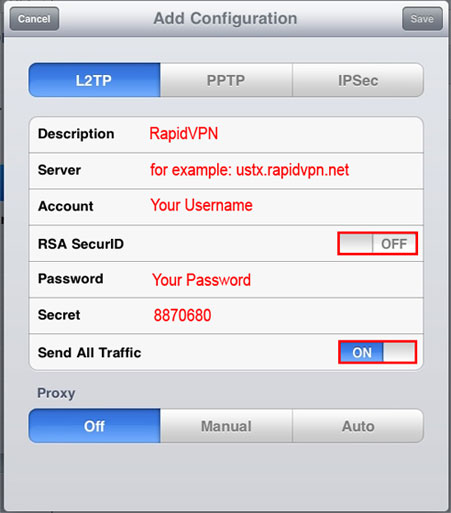
Note: Too see your server IP address, login here (Select "Configurations" from above-right) with your username and password: https://www.rapidvpn.online:3030
2 - Choose "General"
3 - Choose "Network"
4 - Choose "VPN"
5 - Choose "Add VPN Configuration"
6 - Choose "L2TP" and configure your VPN like below:
Note: Too see your server IP address, login here (Select "Configurations" from above-right) with your username and password: https://www.rapidvpn.online:3030
2